


Most boards already produce the raw material for good analytics. Every meeting generates decisions, motions, votes, attachments, and follow-up items. The problem isn't that the data doesn't exist — it's that it lives in three incompatible worlds. Minutes sit in a Word doc. KPIs live in Finance's BI tool. Document metadata (if it exists at all) lives in whatever naming convention the corporate secretary happened to use that quarter.
When someone asks "which board decisions actually moved the needle on our capital efficiency last year?" the honest answer at most companies is: nobody can query that. Someone has to read minutes manually, cross-reference them with a finance dashboard, and reconstruct the link from memory. That's not oversight. That's archaeology.
This piece lays out a lightweight canonical schema — a governance data model with a decision log schema at its center — that connects board decisions to the systems where their consequences actually show up. Not a rip-and-replace platform. A thin layer of structure that makes the records you already keep queryable, auditable, and useful downstream.
Why the disconnect happens in the first place
The gap between board records and enterprise data isn't really a technology failure. It's a modeling failure. Decisions and KPIs get recorded by different people, for different purposes, at different times, with no shared identifier.
A typical example: the comp committee approves a revised bonus pool structure in Q1. The decision gets minuted as prose — "the Committee approved management's proposal regarding the FY performance framework." Meanwhile HR updates the compensation model in their HRIS, Finance adjusts the accrual, and the eventual payout shows up in a variance report eleven months later. Three systems touched the same decision. Zero of them share a key.
So when the payout comes in 18% over plan and someone asks whether the board understood the sensitivity when they approved it, there's no trail connecting the approval to the outcome. The decision log says "approved." The dashboard says "over budget." Nobody linked them.
This tends to stay invisible until it suddenly matters — an audit, a restatement, a regulator asking "when did the board know?" At that point, reconstruction costs are enormous, and the answers tend to be defensive rather than confident.
The root cause is almost always the same: decisions are stored as narrative, not as structured records with stable identifiers. You can't join narrative to a KPI table. If you've already invested in a solid document taxonomy and metadata standard, you're halfway there — but metadata on documents isn't the same as structured decision records that carry forward into outcome systems.
The core of the model: a decision as a first-class record
The whole approach hinges on one shift: treat each board decision as its own object with a permanent identifier, not as a paragraph inside a minute.
Eliminate boardroom chaos with seamless coordination.
Panlly simplifies scheduling, collaboration, and follow-ups for every board meeting.
- Centralized meeting scheduling
- Secure document sharing
- Task assignment & tracking
No credit card required
Every decision gets a decision_id the moment it's logged — before the meeting is even over. That ID becomes the join key everything else hangs off of. Document metadata references it. KPI mappings reference it. Action items reference it. Legal holds reference it. Once a decision has a stable key, you can connect it to anything.
Here's the minimal set of fields that make a decision record actually useful downstream. You don't need more than this to start:
| Field | Type | Purpose | Example |
|---|---|---|---|
decision_id | string (immutable) | Universal join key | BD-2025-Q1-014 |
meeting_id | string | Links to the session it came from | BOARD-2025-03-11 |
committee | enum | Which body decided | Compensation |
decision_type | enum | Category for filtering | Policy Approval |
motion_text | text | The exact wording as minuted | "Approved FY26 STI framework" |
vote_result | enum | Outcome | Carried (7-0-1) |
decision_date | date | When it was made | 2025-03-11 |
sponsor | string | Accountable executive | CFO |
linkedkpiids | array | KPIs this decision is expected to affect | [KPI-STI-VAR, KPI-COMP-RATIO] |
evidence_refs | array | Document metadata IDs supporting it | [DOC-2025-0442, DOC-2025-0443] |
status | enum | Lifecycle state | Approved → In Execution |
legalholdflag | boolean | Whether records are frozen | false |
The trick is the linkedkpiids and evidence_refs arrays. Those two fields are what turn a static log into a network. One connects the decision forward — to the metrics it should influence. The other connects it backward — to the documents that justified it.
This schema stays deliberately thin. The mistake people make when they first attempt this is over-modeling — trying to capture nuance, dissent, conditions, and every deliberation thread as structured fields. That's how governance data projects die. Keep the canonical model small. Put the nuance in motion_text and linked documents, not in fifty columns.
Mapping decisions to KPIs and enterprise systems
The linkedkpiids field is where the model earns its keep, but it only works if there's a mapping table that defines what each KPI is and where it lives.
The pattern is a simple many-to-many bridge. A decision can influence several KPIs; a KPI can be influenced by several decisions. You don't try to prove causation — you assert expected relationship. The value isn't statistical, it's traceability. When the KPI moves, you can see every decision the board expected to affect it.
A KPI mapping table looks like this:
| `kpi_id` | KPI Name | Source System | Owner | Refresh | Board-Facing |
|---|---|---|---|---|---|
KPI-STI-VAR | STI Payout Variance vs Plan | Finance BI | FP&A | Monthly | Yes |
KPI-COMP-RATIO | Total Comp / Revenue | HRIS + ERP | HR Ops | Quarterly | Yes |
KPI-ATTR-VOL | Voluntary Attrition Rate | HRIS | People Analytics | Monthly | Committee only |
KPI-CAP-EFF | ROIC | ERP | Corporate Finance | Quarterly | Yes |
Now the join is trivial. A decision record carries linkedkpiids: [KPI-STI-VAR]. The KPI mapping tells the dashboard where that metric comes from and who owns it. Your HR or Finance dashboard can display, next to any board-relevant KPI, the decisions the board tied to it — with dates, sponsors, and links to the supporting evidence.
This is the layer that makes the connection to KPIs operationally real rather than theoretical. If you've read our earlier work on the board reporting framework that maps decisions to KPIs, this schema is the data plumbing underneath that framework — the part that makes those dashboards actually queryable instead of manually assembled each quarter.
A minimal ETL flow
-
Capture at source. The corporate secretary logs the decision during or immediately after the meeting, assigning
decision_idand filling the core fields. This is the single most important step — structure has to be captured at creation, not reconstructed later. -
Validate on entry. Run validation rules before the record is committed (covered below). Reject anything missing a KPI link or evidence reference for decision types that require them.
-
Enrich with metadata. Resolve
evidence_refsagainst your document store so the record carries live links, not dead file names. -
Publish to a staging table. A flat, read-only decisions table keyed on
decision_id, refreshed nightly. -
Join to KPI sources. The dashboard layer joins the staging table to Finance/HR KPI feeds via the mapping table.
-
Surface in dashboards. Each board-facing KPI shows its linked decisions; each decision shows its downstream metrics and current status.
The whole thing can run as a nightly batch. You're not doing real-time streaming of boardroom votes. Daily freshness is more than enough for governance analytics.
The diagram below illustrates that simple ETL flow.
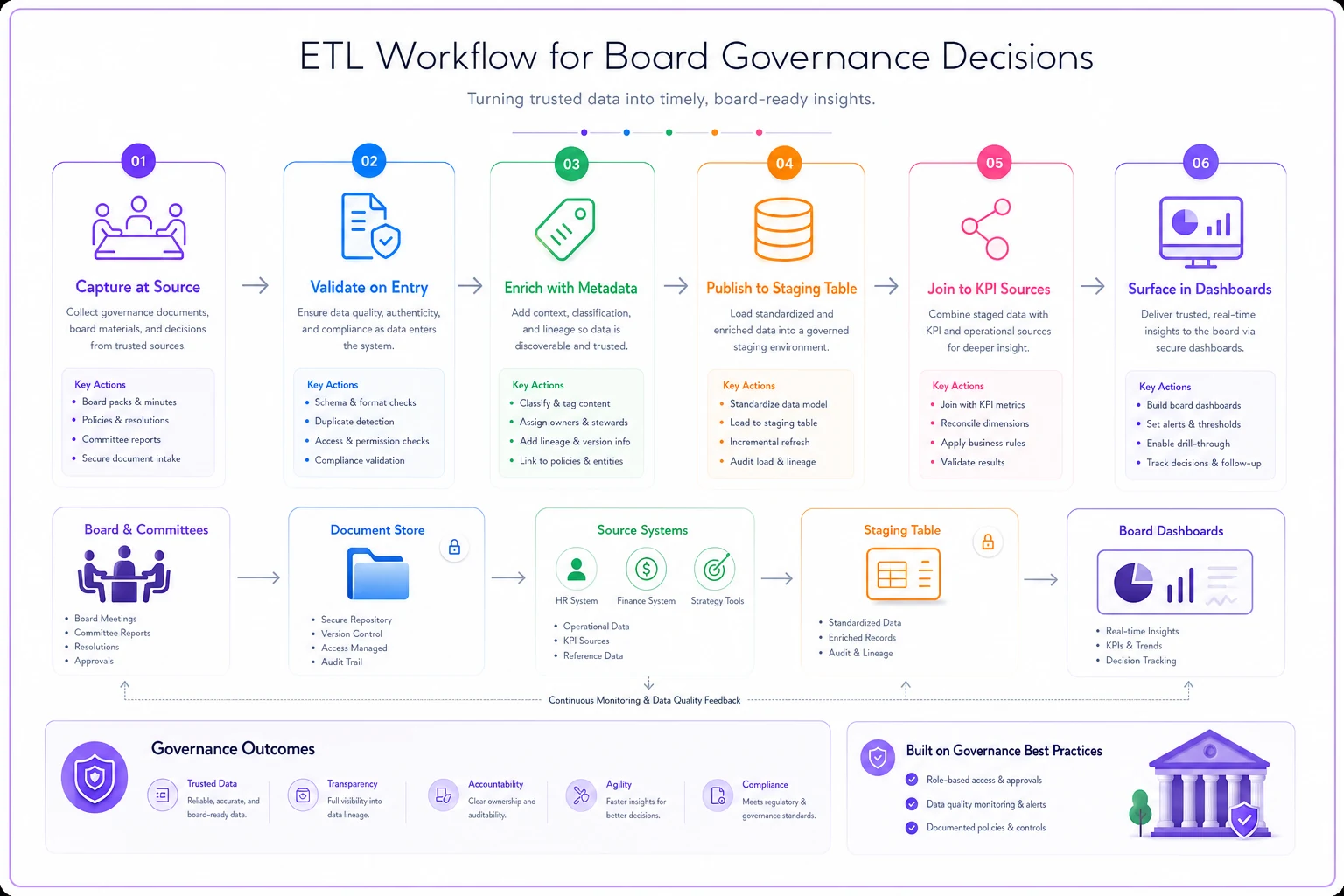
The whole flow is intentionally lightweight and can be implemented with nightly batches and a staging join for dashboards.
Validation rules: the part everyone skips
A schema without validation degrades into garbage within two quarters. Someone logs a decision with no evidence reference, another with a malformed date, a third with a KPI link pointing at a retired metric. Six months later the dashboard is full of orphaned records and nobody trusts it.
The validation rules that actually matter are boring and enforceable:
-
Immutability check
decision_idcan never be edited or reused. If a decision is superseded, log a new record and link back — never overwrite. -
Required-field logic by type A
Policy Approvalmust carry at least onelinkedkpiid. ASpending Authorizationmust carry asponsorand an evidence reference. Consent-agenda items may have relaxed requirements. -
Referential integrity Every
linkedkpiidmust exist in the active KPI mapping table. Everyevidence_refmust resolve to a real document. Orphan references get flagged, not silently dropped. -
Vote consistency
vote_resultmust reconcile with recorded attendance — you can't have an 8-0 vote in a meeting with six directors present. -
Status transitions
statuscan only move along defined paths.Approvedcan go toIn ExecutionorRescinded, but not back toProposed. -
Legal-hold lock If
legalholdflagis true, the record and its linked evidence become read-only regardless of retention schedule.
That last one is where governance data models quietly go wrong, so it deserves its own section.
Retention and legal holds: where the model has to be careful
Board records live under retention schedules — keep for X years, then dispose. But the moment litigation or an investigation is reasonably anticipated, a legal hold overrides the schedule and freezes everything relevant. A data model that automates disposal without respecting holds is a liability, not a convenience.
The interplay has to be explicit in the schema. Retention and legal hold are two separate flags that resolve in a fixed order:
| Retention State | Legal Hold | Result |
|---|---|---|
| Within retention period | No | Retain, editable per workflow rules |
| Past retention period | No | Eligible for disposition |
| Within retention period | Yes | Retain, locked read-only |
| Past retention period | Yes | Retain — hold overrides disposal |
The rule that must never break: legal hold always wins. A decision record flagged under hold cannot be disposed of even when its retention clock expires, and it cannot be edited even when the workflow would normally allow it.
Where this gets operationally tricky is the linked evidence. A decision under hold has to freeze not just its own record but every document in its evidence_refs. In practice this is where things fall apart — the decision log gets frozen, but the underlying board pack in a separate system quietly ages out and gets purged on schedule. Now you have a preserved decision pointing at deleted evidence, which is arguably worse than losing both.
The fix is to propagate the hold flag through the evidence links. When a decision is placed on hold, the system flags every referenced document too. This only works if your decisions and documents share the join keys the model is built on — another reason the evidence_refs array isn't optional.
A real scenario
A mid-market industrial company — roughly 900 employees, board of eight — kept solid minutes but had no structured link between decisions and outcomes. Their audit committee spent a good chunk of each year answering the same class of question: "did the board approve this, and when, and what did they see?"
Before restructuring their records, reconstructing a single decision trail for an auditor took the corporate secretary somewhere around 6–9 hours of digging through emails, board packs, and past minutes. During a regulatory inquiry the prior year, assembling the decision history for one compensation matter took most of two weeks across three people.
They didn't buy a big platform. They adopted a version of this schema — decision IDs, a KPI mapping table, evidence links, and the legal-hold interplay — and backfilled roughly 18 months of prior decisions. The backfill was tedious, maybe three weeks of part-time work.
What changed after that was less dramatic-sounding than you'd expect, and more valuable than it sounds. Reconstructing a decision trail dropped from hours to a query that returned in seconds. The audit committee started receiving a standing report: board-facing KPIs with their linked decisions attached. And during the next auditor request, the secretary answered a decision-history question the same afternoon instead of scheduling a scramble. No revenue miracle — just a governance function that could answer its own questions on demand.
When this makes sense — and when it doesn't
This isn't right for every board. The structure is worth it when:
-
Your board makes decisions with measurable downstream financial or HR consequences.
-
You face real audit, regulatory, or litigation exposure where "when did the board know" gets asked.
-
You've outgrown the point where one person can hold the decision history in their head.
-
You already have KPI dashboards but can't tie board decisions to them.
It's a bad idea, or at least premature, when:
-
Your board meets a few times a year and makes a handful of decisions — the overhead outweighs the benefit.
-
You don't yet have a reliable document metadata standard to reference. Build that foundation first; the evidence links depend on it.
-
Nobody owns the corporate secretary function seriously. If capture-at-source won't happen consistently, the model degrades immediately.
The teams who should not attempt this are those hoping the schema will fix a discipline problem. It won't. If decisions aren't being logged carefully today, adding fields just gives you more ways to log them carelessly. Get the recording habit solid first.
Where the model connects to execution
A decision record isn't finished when it's logged — most decisions spawn action items with owners and deadlines. The same decision_id that connects a decision to its KPIs should connect it to its follow-ups, so the loop closes from approval to outcome. This is where the schema meets execution tracking, and it pairs naturally with a discipline of automating action-item follow-up with SLAs and escalation rules so that decisions don't stall between the vote and the result.
When action items carry the parent decision_id, you get something most boards never have: a single query that shows a decision, the documents that justified it, the KPIs it was meant to move, the follow-ups it generated, and the current status of all of it. That's the whole point of the model — not more reporting, but one connected chain from deliberation to result.
Getting started without boiling the ocean
You don't roll this out all at once. The realistic path is narrow and incremental.
-
Pick one committee — Audit or Comp usually — and one decision type.
-
Define the minimal schema and a small KPI mapping table for that scope only.
-
Log new decisions in the structured format going forward; don't backfill everything at once.
-
Wire the validation rules for referential integrity and legal holds before you connect any dashboards.
-
Add a single dashboard view that shows linked decisions next to their KPIs.
-
Expand to other committees once the pattern proves itself.
Start with the committee that has the tightest KPI connections—Audit or Comp—to demonstrate quick value.
Start small, prove the join works, and let the value pull the rest of the organization in.
The governance data model and decision log schema described here isn't glamorous. It's a set of stable identifiers, a couple of mapping tables, some validation rules, and a legal-hold interlock. But that thin layer is the difference between a board that produces records and a board that can actually answer questions about its own decisions — quickly, confidently, and with the evidence attached. That capability tends to feel abstract right up until the moment someone asks "when did the board know?" — and then it's the only thing that matters.
Ready to enhance your board's productivity?
Join 500+ organizations using Panlly to save time, improve governance, and streamline board operations.