


Your general counsel just called. The SEC wants documentation on a risk oversight decision from fourteen months ago—specifically how the board evaluated cybersecurity protocols after a third-party vendor breach. You know the discussion happened. You remember the committee presentation. But finding the actual materials? That's where things get messy.
Most corporate secretaries maintain board archives that look organized on the surface. Folders labeled by date. Minutes filed chronologically. Presentation decks saved with meeting names. But when regulators ask for specific decision documentation—or when new directors need context on past strategic choices—these filing systems fall apart quickly.
The problem runs deeper than folder structure. Without a proper board document taxonomy and a consistent metadata schema that captures decision context rather than just dates, you're essentially storing unsearchable PDFs in digital filing cabinets. Critical governance materials become invisible the moment they're archived.
Why traditional board filing systems break under pressure
Board materials accumulate differently than operational documents. Each quarterly meeting generates somewhere between 200 and 300 pages of materials. Committee meetings add another 100 to 150 pages per quarter. Special sessions, written consents, and between-meeting decisions create irregular document bursts. After three years, you're managing thousands of pages of governance records.
The typical filing approach treats all of this like static archives. Save the board deck. File the minutes. Store committee reports. Maybe add version numbers if you remember. This works fine when you know exactly which meeting to search—but governance questions rarely arrive that cleanly packaged.
Consider what happens during a regulatory inquiry. The examiner doesn't ask for "the March 2023 board meeting minutes." They request "all board discussions regarding vendor risk management protocols between January 2022 and June 2023, including related committee deliberations and management presentations."
Suddenly you're opening dozens of PDFs, searching for keyword mentions, trying to piece together a decision trail across multiple meetings and committees. What should take an hour becomes a multi-day archaeology project.
The same breakdown occurs during D&O insurance claims requiring decision documentation, new director onboarding needing historical context, strategic planning sessions referencing past choices, annual compliance certifications, and merger due diligence reviews. Without proper metadata tagging, every document request triggers a manual search marathon.
Building a metadata schema that actually works
A functional board document taxonomy starts with understanding how governance materials interconnect. Unlike departmental files that live in isolation, board documents form decision chains. Today's audit committee discussion links to last quarter's risk assessment, which connects to a board resolution from six months ago.
Eliminate boardroom chaos with seamless coordination.
Panlly simplifies scheduling, collaboration, and follow-ups for every board meeting.
- Centralized meeting scheduling
- Secure document sharing
- Task assignment & tracking
No credit card required
Core identification fields:
-
Document ID (unique identifier)
-
Meeting type (board/committee/special/consent)
-
Meeting date
-
Document category (minutes/presentation/report/resolution/exhibit)
-
Version number
-
Status (draft/final/amended)
Context and linkage fields:
-
Primary topic tags (3-5 keywords)
-
Decision type (approval/discussion/information)
-
Related documents (linked by ID)
-
Committee origin (if applicable)
-
Executive owner
-
Regulatory relevance flag
Retention and access fields:
-
Retention category (permanent/7-year/3-year)
-
Confidentiality level
-
Legal hold status
-
Last accessed date
-
Audit trail link
This schema does more than organize files—it creates a searchable knowledge base. When regulators request "all cybersecurity oversight discussions," you query documents tagged with "cybersecurity" + "oversight" rather than manually scanning hundreds of PDFs.
Version control that preserves decision evolution
Board materials evolve through multiple iterations. The initial management presentation becomes a committee draft, gets revised after preliminary review, updates again following committee discussion, and transforms once more for full board consideration. Each version tells part of the governance story.
Traditional versioning—v1, v2, v3—loses that context entirely. Instead, implement semantic versioning that captures the evolution stage:
-
INIT
Initial draft from management
-
COMM
Committee review version
-
COMMREV
Post-committee revision
-
BOARD
Board meeting version
-
FINAL
As-approved final version
-
AMENDED
Post-meeting amendments
Link these versions through a parent document ID, creating a complete audit trail of how decisions developed. This matters during litigation when opposing counsel requests "all versions of the strategic plan, including drafts and revisions."
The version control system should also track who requested each revision, what changed between versions, when versions were distributed, which version appeared in board books, and whether directors accessed pre-meeting drafts.
Linking decisions across meetings and committees
Board governance rarely happens in a single meeting. Major decisions flow through committees, require multiple discussions, and generate follow-up actions across quarters. Your metadata schema has to capture these connections.
Start with a decision log ID system. Every significant board action gets a unique identifier that follows it through the governance process. Here's what that looks like in practice:
DEC-2024-001: Cybersecurity Program Enhancement
-
Audit committee review (Q1 meeting)
-
Risk committee assessment (Q1 meeting)
-
Board discussion (Q1 meeting)
-
Resolution approval (Q2 meeting)
-
Implementation update (Q3 meeting)
-
Effectiveness review (Q4 meeting)
Each document related to this decision links back to DEC-2024-001, creating a complete decision narrative. When someone asks "what did we decide about cybersecurity and why," you pull the entire chain—not just the final resolution.
This linkage also supports preventing repeated debates through institutional memory. New directors can see why certain strategic options were rejected. Committees understand what the full board already considered. Management knows which proposals failed previously and on what grounds.
Query templates for rapid retrieval
Even perfect metadata becomes useless without effective search strategies. Most board portals offer basic keyword search, but governance questions require complex queries combining multiple criteria.
Build standard query templates for common retrieval scenarios:
Regulatory examination queries:
-
All documents WHERE topic = "[regulated area]" AND date BETWEEN [exam period] AND (decision_type = "approval" OR "oversight")
-
All risk committee materials WHERE regulatory_flag = TRUE AND date >= [lookback period]
Director onboarding queries:
-
All documents WHERE decisiontype = "strategic" AND date >= [24 months ago] ORDER BY impactlevel DESC
-
All unresolved action items WHERE status = "open" GROUP BY committee
Annual compliance queries:
-
All documents WHERE document_category = "charter" AND status = "current"
-
All committee reports WHERE contains "independence" OR "conflicts" AND date >= [fiscal year start]
Litigation hold queries:
-
All documents WHERE legal_hold = TRUE OR (topic CONTAINS "[matter keywords]" AND date BETWEEN [preservation period])
-
All versions WHERE parent_document IN [disputed decisions]
Store these templates in your governance platform. When requests arrive, apply the appropriate template rather than crafting new searches from scratch. This cuts retrieval time from hours to minutes while ensuring consistent, complete responses.
Retention mapping that reduces risk and storage costs
Board materials can't all live forever, despite the temptation to keep everything "just in case." Proper retention mapping balances legal requirements, business needs, and storage costs while ensuring critical documents stay accessible.
Map each document category to specific retention rules:
| Document Type | Retention Period | Trigger Event | Special Conditions |
|---|---|---|---|
| Board minutes | Permanent | N/A | Physical backup required |
| Committee minutes | Permanent | N/A | Physical backup required |
| Resolutions | Permanent | N/A | Include exhibits |
| Annual strategic plans | 10 years | Plan year end | Keep final version only |
| Routine presentations | 7 years | Meeting date | Unless litigation hold |
| Draft materials | 3 years | Final version approval | Keep if substantive changes |
| Board books | 7 years | Meeting date | Complete package |
| D&O questionnaires | 7 years | Submission date | Include conflicts disclosed |
Apply retention categories at the metadata level, not through manual culling. Set automated disposition workflows that flag documents approaching retention limits, but require human confirmation before deletion. This prevents accidental disposal while reducing archive bloat.
A few special retention considerations worth noting: documents under legal hold override standard retention schedules, M&A-related materials may require extended retention, regulatory investigation materials need special handling, and whistleblower-related documents require permanent retention regardless of category.
Building compliance-first retention practices protects against both premature disposal and excessive accumulation.
Audit response workflows using metadata filters
When audit requests arrive, metadata-driven retrieval transforms response times. Instead of manually reviewing documents, you apply targeted filters that surface exactly what auditors need.
Here's how the workflow operates step by step:
-
Parse the request into metadata queries — identify date ranges, extract topic keywords, determine document types needed, and note any specific decisions referenced
-
Apply progressive filters — start with broad date and topic filters, then narrow by document category, filter by decision type, and check for linked documents
-
Validate completeness — cross-reference against meeting calendars, verify all committees are covered, check for amended or superseded documents, and confirm related decisions are included
-
Prepare the production — generate a document index with metadata, include version histories where relevant, note any privileged materials withheld, and create an audit trail of the search methodology
A healthcare organization facing FDA scrutiny over quality system oversight used metadata filters to produce 18 months of relevant board and quality committee materials in about four hours—including all discussions, decisions, and follow-up actions. Without metadata, that same request would have meant days of manual document review. That's not a hypothetical; that's what structured tagging actually buys you when it matters most.
Below is a visual workflow of that audit response process.
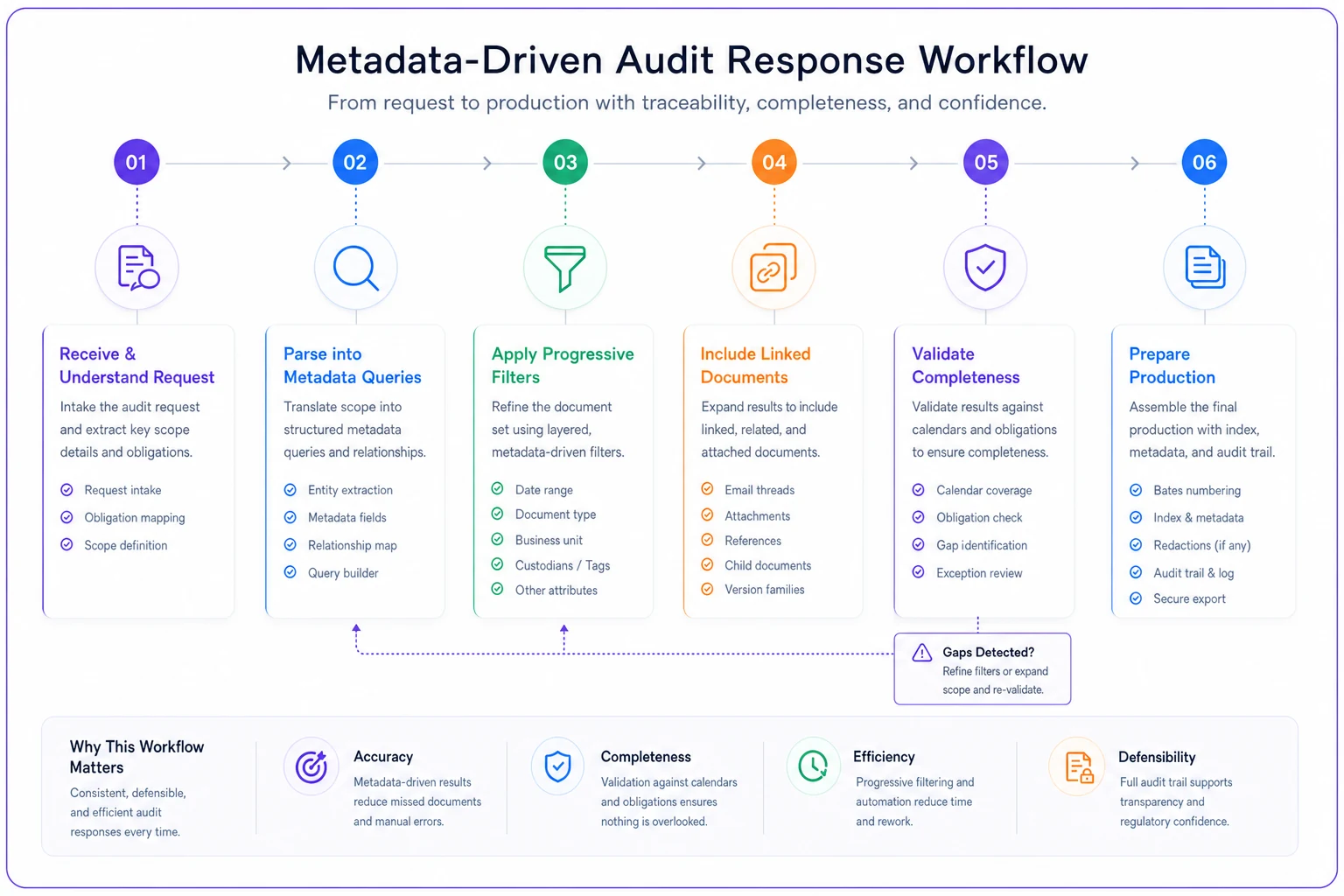
The diagram outlines the key steps to speed up audit responses.
Common metadata mistakes that cripple retrieval
Even well-designed taxonomies fail when implementation gets sloppy. These patterns consistently undermine board document systems.
Inconsistent tagging enforcement. The general counsel tags meticulously. The corporate secretary adds basic fields. Executive assistants skip metadata entirely. The result is swiss cheese coverage that makes comprehensive retrieval impossible.
Over-granular topic categories. Creating 200 topic tags seems thorough until you realize "cyber," "cybersecurity," "information security," and "data security" all describe the same discussions. Searches miss relevant documents hidden under synonym tags.
Ignoring committee-to-board flows. Tagging committee documents separately from related board materials breaks decision chains. The audit committee's risk review becomes invisible when searching for board risk oversight.
Version control breakdown. Saving new versions without updating metadata creates orphan documents. The "final" board presentation might actually be three versions old, but the metadata still shows it as current.
Postponing retroactive tagging. "We'll tag the historical documents later" never happens. Legacy materials stay unsearchable, creating gaps in institutional memory and audit responses.
These aren't edge cases. They're the default outcome when metadata standards exist on paper but nobody owns enforcement in practice.
Platform considerations for board document management
Manual metadata management doesn't scale. Once you pass around 1,000 documents, consistent tagging requires system support. Modern board portals and governance platforms offer metadata capabilities, but implementation quality varies quite a bit.
Essential platform features include customizable metadata schemas, bulk tagging capabilities, automated extraction from document text, cross-document linking, version chain tracking, advanced query builders, retention workflow automation, and audit trail generation.
AI-assisted platforms can auto-suggest tags based on document content, flag missing metadata fields, and identify related documents through semantic analysis. This reduces the manual burden while improving consistency—without requiring someone to manually touch every file.
The platform should also enforce metadata standards at the point of upload. Reject documents missing required fields. Flag inconsistent tagging patterns. Alert when retention deadlines approach. These guardrails prevent the gradual degradation that kills manual systems over time.
Integration matters too. Your board document taxonomy should connect with broader enterprise information governance. Legal holds from the legal department should automatically apply to board materials. Compliance requests should search across both operational and governance documents. A system that lives in isolation from the rest of your information infrastructure will always create gaps.
Making metadata adoption actually stick
The best taxonomy fails if nobody uses it consistently. Board document metadata requires buy-in from general counsels, corporate secretaries, and executive assistants—people already managing heavy governance workloads.
Start with the pain points. Show how metadata prevents those painful last-minute scrambles during audit requests. Demonstrate faster director onboarding. Highlight reduced legal risk through better retention management.
Build templates that pre-populate common metadata. Board meeting materials always include standard tags. Committee documents inherit metadata from their charter. Resolutions auto-link to originating discussions. The less manual tagging required, the higher compliance rates tend to climb.
Pre-populate common tags and inherit committee metadata to reduce manual entry and increase compliance.
Train on real scenarios, not abstract concepts. Walk through an actual regulatory request. Show how metadata would have accelerated a recent document production. Use examples from your organization's actual board materials rather than hypotheticals—people engage with problems they've already experienced.
Monitor and report on metadata quality. Track completion rates by document type. Identify consistent tagging gaps. What gets measured gets maintained.
Start small. Pick one committee or document type, perfect the metadata approach there, prove the value, then expand. Sweeping changes to board document management trigger resistance. Incremental improvements tend to stick.
The compound value of searchable board archives
A properly tagged board archive does more than accelerate retrieval.
Directors gain institutional memory without reading thousands of pages. New board members understand why certain strategies were rejected. Committees see how their recommendations influenced board decisions. Management learns which presentation approaches actually land.
Risk and compliance teams can proactively identify governance gaps. Instead of waiting for audit findings, they query for missing oversight discussions, overdue reviews, or incomplete decision documentation. Problems surface before regulators arrive.
Legal teams build stronger defenses in litigation. When plaintiff's counsel claims the board ignored risks, you produce comprehensive documentation of oversight discussions, expert consultations, and deliberate decision-making. Metadata-driven retrieval ensures nothing gets missed.
The taxonomy also reveals governance patterns over time. Which topics consume board time? How long do decisions take from proposal to approval? Which committees drive strategic discussions? These insights improve governance efficiency in ways that are genuinely hard to achieve otherwise.
Over time, your searchable archive becomes a governance knowledge base—a living repository of institutional wisdom accessible to current and future boards.
Moving forward with your board document taxonomy
Building an effective board document taxonomy doesn't require perfection from day one. Start with core metadata fields that address your biggest retrieval challenges. Add sophistication as adoption grows and value becomes clear.
Focus initially on go-forward documents. Tag new materials consistently before tackling historical archives. Build momentum through small wins—successful audit responses, faster director onboarding, cleaner retention management.
Keep it practical. Don't create complex taxonomies that impress information architects but frustrate corporate secretaries. The goal isn't perfect documentation—it's findable documentation when governance questions arise.
Whether you're facing regulatory scrutiny, litigation discovery, or simply trying to onboard a new director before a crucial vote, your board materials should surface quickly and completely. The difference between 30 seconds and 3 hours might seem minor in the abstract. It doesn't feel minor when you're staring down an SEC deadline.
That's when a thoughtful document taxonomy, consistently applied and properly supported, pays for itself many times over.
That's when a thoughtful document taxonomy, consistently applied and properly supported, pays for itself many times over.
Ready to enhance your board's productivity?
Join 500+ organizations using Panlly to save time, improve governance, and streamline board operations.