

The worst version of this problem shows up months after the meeting, not during it. A regulator or opposing counsel asks a simple question: Who had access to the draft resolution, on what device, and was it still on that device after the vote? And nobody on the governance team can answer it, because three directors joined from personal iPads, one read the pack on a hotel business-center laptop, and the general counsel forwarded a PDF to a personal Gmail "just to read on the flight."
BYOD and remote participation aren't going away. Directors are often busy people who sit on multiple boards, travel constantly, and have zero patience for a locked-down corporate laptop they have to carry around for four meetings a year. So the real question isn't whether to allow personal devices — it's how to make personal-device access convenient enough that directors actually comply while staying defensible enough that you can prove what happened if someone comes asking.
This is a narrow problem, and most of the advice floating around treats it like generic enterprise endpoint management. Boards aren't enterprise users. You can't push an MDM agent onto a director's personal phone and expect them to accept it. What you can do is build a layered approach around device configuration, time-limited access, pre-meeting tech checks, and secure evidence capture — and that's what this covers.
Why director devices are a special case
Standard corporate security assumes you own the device. You don't. A director's iPad is their iPad. Their spouse might use it. Their assistant might have the password. It might get sold or handed down in a couple of years. So every control you design has to work on hardware you have no permanent authority over.
What makes this harder is that directors are, by definition, the people with access to the most sensitive material — unannounced M&A, layoff plans, investigation findings, executive comp. A breach of a director's personal device isn't just a data incident. It's a potential market-moving leak or a D&O exposure event.
There's also a pattern worth naming: the weakest link is almost never the sitting directors themselves. It's the edges. The retired director who stays on for a transition quarter and still has portal access. The director's executive assistant who was granted "temporary" access to download a pack and never got removed. The board observer from a PE firm who joined for one deal discussion. Access that was supposed to be temporary quietly becomes permanent, and nobody notices until an audit forces a review.
Device configuration: the baseline checklist
You're not going to manage these devices like corporate endpoints. Instead, you set minimum conditions for access and verify them — some automatically through the portal, some through attestation. Here's the practical baseline.
Eliminate boardroom chaos with seamless coordination.
Panlly simplifies scheduling, collaboration, and follow-ups for every board meeting.
- Centralized meeting scheduling
- Secure document sharing
- Task assignment & tracking
No credit card required
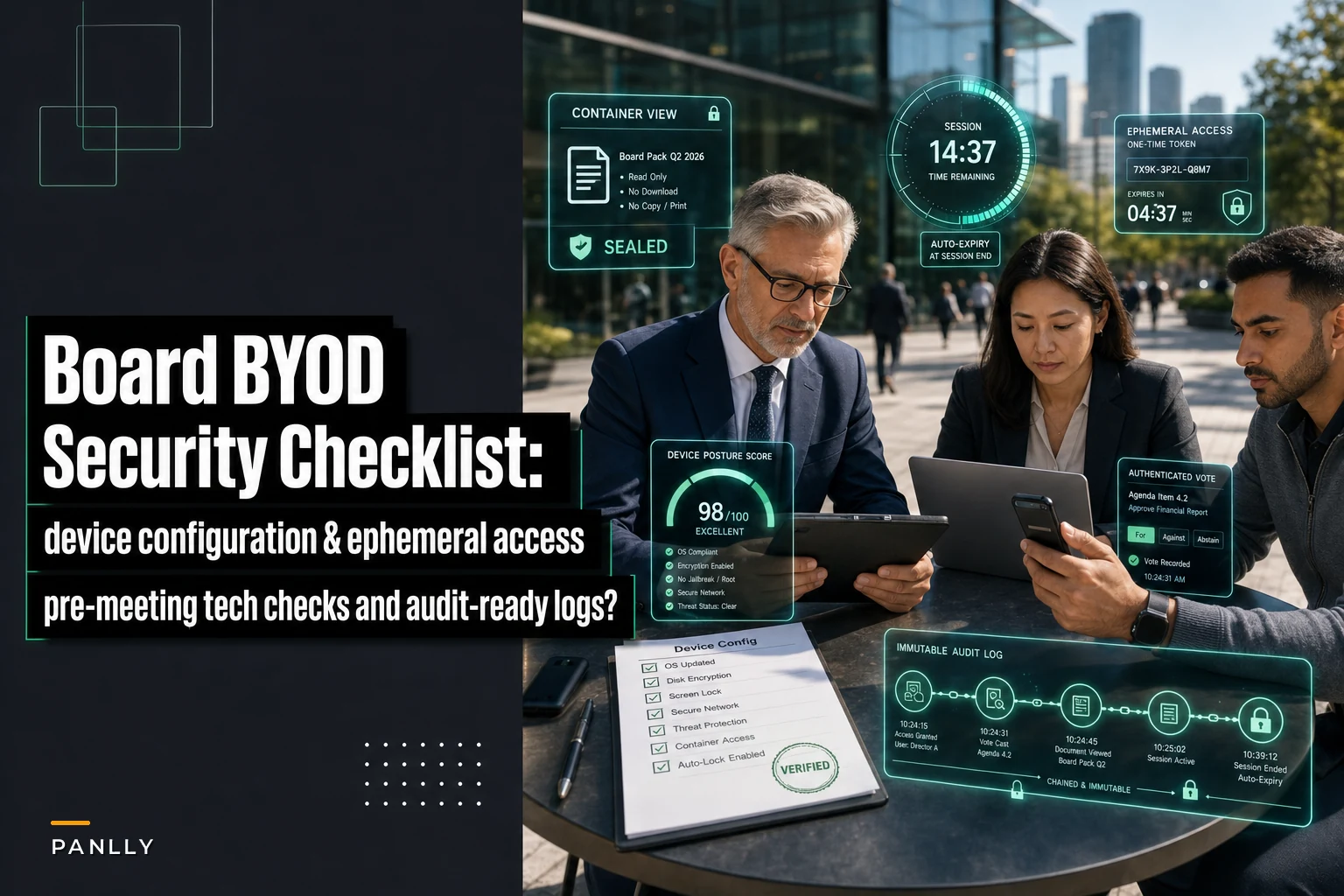
Minimum device configuration checklist for board access:
-
Device-level passcode or biometric lock enabled (no "swipe to unlock" devices)
-
Full-disk / device encryption on (default on modern iOS and recent Android, but verify)
-
Operating system within one or two major versions of current — no end-of-life devices
-
Automatic screen lock set to 2 minutes or less
-
Remote wipe capability enabled (Find My iPhone, Android equivalent, or portal-side container wipe)
-
No jailbroken or rooted devices
-
Board material accessed only through the portal app or a managed browser session — never downloaded to the device's general file storage
-
Personal cloud backup excluded for the board app's container where the platform supports it
Favor container-level controls over whole-device policies to keep directors comfortable.
The important design decision: don't try to control the whole device, control the container. A good board platform keeps materials inside an app sandbox that can be wiped independently of the director's personal photos and email. That's the difference between a director accepting your security posture and refusing it. You're asking to control one app, not their phone.
| Control area | Corporate-managed device | Director BYOD approach |
|---|---|---|
| OS version enforcement | Pushed automatically | Checked at login, access blocked if non-compliant |
| Encryption | Enforced by IT policy | Attested + device posture check |
| Document download | Allowed to managed storage | Blocked; view-only in container |
| Remote wipe | Full device | Container-only wipe |
| App installation control | Fully managed | Out of scope — not your device |
| Offline access | Permitted with encryption | Time-limited or disabled for sensitive packs |
The right-hand column is what actually gets adopted. The second you reach past the container into someone's personal phone, you create friction that pushes directors toward workarounds — and workarounds are where leaks happen.
Ephemeral access rules: the part most boards skip
This is where defensibility actually lives, and it's the most neglected piece. Ephemeral access means access that expires by default instead of persisting until someone remembers to revoke it.
In practice, persistent access is the quiet killer. A director gets added once and stays in the system for years. An assistant gets a login for one meeting cycle. An advisor joins for a single committee session. Every one of these is a standing door into confidential material, and the number of standing doors only ever grows unless something forces them closed.
Practical ephemeral access rules:
-
Per-pack access windows. Highly sensitive packs — M&A, investigations, comp — open a set number of days before the meeting and close a set number of days after. Outside that window, the material isn't viewable, even by sitting directors.
-
Guest and observer access auto-expires. Anyone who isn't a standing board member — observers, advisors, counsel, EAs — gets access that dies automatically at the end of the meeting cycle. Renewal requires a positive action, not inaction.
-
Offline copies have a lifespan. If the platform allows offline viewing, cached material expires and becomes unreadable after a set period. A director who downloaded a pack to read on a plane shouldn't still have a live copy three weeks later.
-
Role changes trigger immediate review. When a director retires, rotates off a committee, or resigns, their access is suspended the same day — not at the next quarterly cleanup.
-
Dormant access gets flagged. Any account that hasn't logged in across a full meeting cycle gets surfaced for review rather than sitting silently.
Here's why this matters in practice: a company runs an internal investigation, shares findings with the audit committee, and the matter closes. Eighteen months later there's litigation. Discovery asks who could access the investigation file. With persistent access, the honest answer is "the entire board, their EAs, and two former members, continuously." With ephemeral access, the answer is "the three audit committee members, during a 21-day window, after which the material auto-closed." One of those answers is a problem. The other is a control you can defend.
That defensibility connects directly to how you keep records. If your minutes and access logs don't hold up to regulator and litigation review, the cleanest device policy in the world won't save you. Ephemeral access only works if the expiry events themselves are logged — who had access, when it opened, when it closed, and that it closed automatically.
A simple workflow captures access windows, checks, and automatic closure.
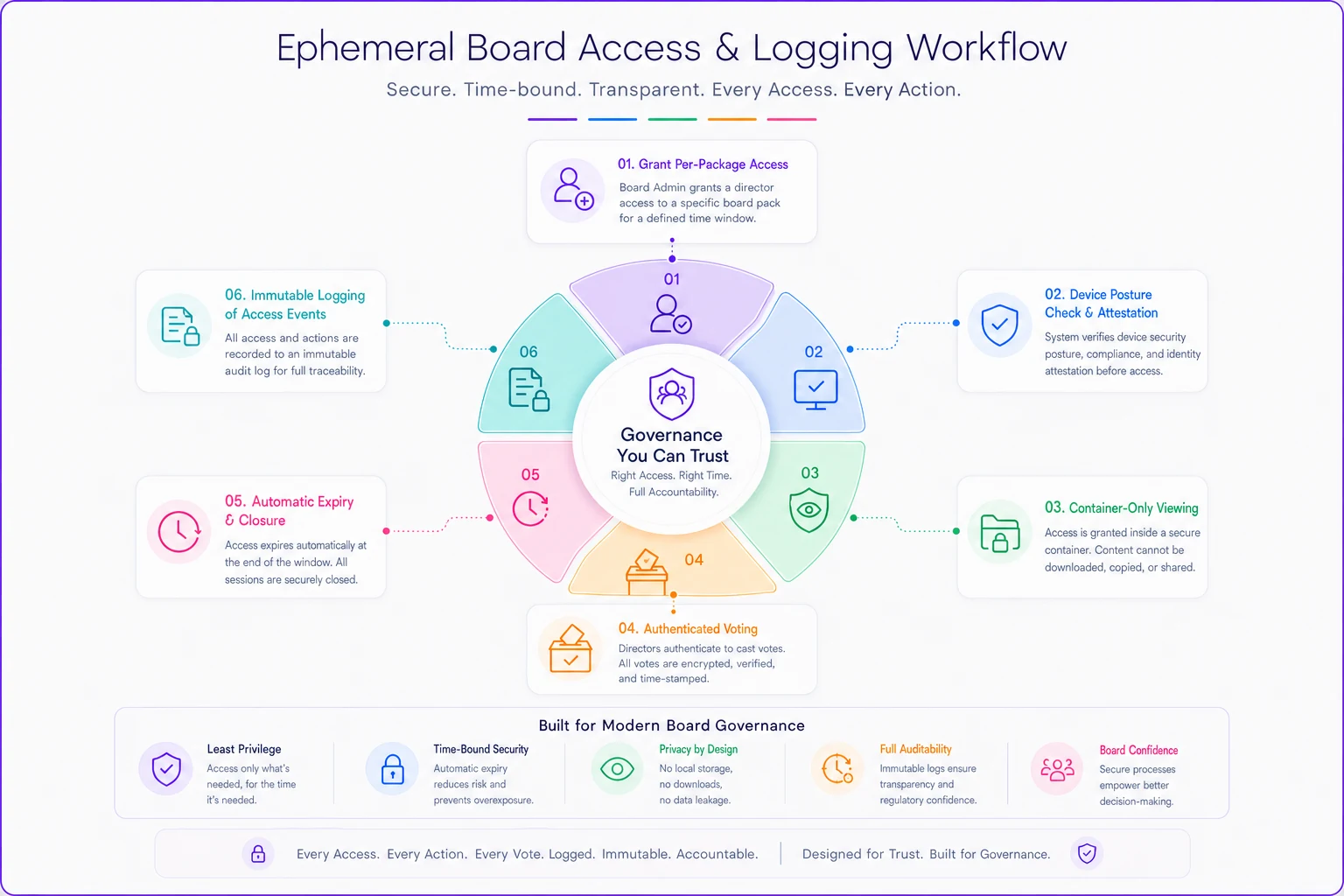
The fix is to flip the default. Instead of "access until revoked," you run "access until expiry, renewed deliberately."
Pre-meeting tech-check scripts
Half the confidentiality problems in remote meetings aren't sophisticated. They're a director joining from a crowded airport lounge with the screen visible to the next seat, or someone who can't get audio working and switches to a personal phone call that isn't on the secure line, or a person in the room off-camera who never gets identified.
A short, enforced tech-check before sensitive sessions solves most of this. The corporate secretary or meeting admin runs it, and it takes around two minutes per participant. It should be a script, not a vibe.
Pre-meeting tech-check script (run 10 minutes before start for sensitive sessions):
-
Confirm each remote participant is in a private location with no one else able to see or hear the screen
-
Ask each participant to confirm no one is off-camera in the room; if someone is present, identify them for the record
-
Confirm participants are joining through the approved portal/meeting link, not a forwarded or personal copy
-
Verify audio is on the secure line, not a parallel phone call
-
Confirm recording status out loud — whether the session is being recorded, and that everyone knows
-
Remind participants that screenshots and screen recording of the board material are prohibited
-
For votes, confirm each participant can see the resolution text and the voting mechanism works before the substantive discussion begins
That last point matters more than people expect. When voting tech fails mid-meeting, boards improvise — and improvised votes are exactly what creates quorum and validity disputes later. If you've ever dealt with hybrid meeting habits quietly breaking quorum and voting integrity, you know a 90-second check beforehand prevents an hour of cleanup afterward. The same logic applies to anything running through secure proxy and e-consent workflows — verify the mechanism works before you need it to count.
Confidentiality and voting problems are cheap to prevent before the meeting and expensive to fix after. The tech-check is the cheapest insurance on the agenda.
Secure evidence capture without destroying defensibility
There's a tension nobody talks about cleanly here. You want to prove what happened in a meeting — attendance, votes, who saw what. But you don't want to create a sprawling pile of recordings and screenshots that becomes a discovery nightmare and a confidentiality risk in its own right.
Boards make this mistake at both extremes: capturing nothing (so they can't prove attendance or votes when challenged) or capturing everything (full video recordings of every session that live forever and hand opposing counsel a buffet).
The balanced approach captures the metadata of participation and decisions rather than the full sensory record of the discussion. What you actually need for defensibility:
-
Authenticated attendance log — who joined, from what device type, at what time, through what access method
-
Vote records tied to authenticated identity, with timestamps
-
Access logs showing who opened which materials and when
-
Expiry/closure events for ephemeral access
-
Confirmation that the tech-check ran and private-location attestations were given
-
The approved minutes as the authoritative record of discussion
What you generally should not keep as standing practice: full video or audio recordings of sensitive deliberations, retained indefinitely. If you record for minute-taking purposes, have a defined short retention and deletion step, and document that the deletion happened. A recording you promised to delete but didn't is worse than never recording at all.
A workflow that holds up looks like this: a director logs in through the portal on their personal iPad, the system performs a device posture check and logs the device type and compliance status, the director attests to a private location during the tech-check, they view the pack inside the container with no download option, they vote through the authenticated mechanism which timestamps and attributes the vote, the access window closes automatically a few days after the meeting, and every one of those events lands in an immutable log. The discussion lives in the minutes. The proof of process lives in the logs. Neither one is a video file sitting on a shared drive for a decade.
When heavier controls actually make sense — and when they don't
Not every board needs the full apparatus for every meeting. Over-engineering this is a real failure mode: you build a fortress for routine quarterly updates, directors get annoyed, and compliance quietly erodes.
When the full checklist makes sense:
-
M&A, material transactions, and anything market-moving
-
Investigations, whistleblower matters, and legal privilege material
-
Executive comp and layoff planning
-
Anything where you can realistically imagine future litigation or a regulator asking "who saw this?"
When lighter-touch is fine:
-
Routine operational updates with no price-sensitive content
-
Pre-reads that are already public or near-public
-
Standing committee administrivia
Who should not attempt heavy BYOD controls at all:
-
very small boards with no governance platform and no admin capacity. If you can't actually enforce and log the controls, a policy document claiming you do is worse than an honest, simpler posture — because now you've written down a standard you're failing to meet. Match the controls to what you can genuinely operate and prove.
Match the controls to what you can genuinely operate and prove.
A short real scenario
A mid-sized credit union board — nine directors, most of them busy professionals who refused corporate laptops — ran everything through personal devices and forwarded PDFs by email. During a sensitive leadership transition, a draft succession memo ended up on a director's personal account and surfaced informally before the board had decided anything. No malicious leak, just loose handling. The fallout cost them weeks of trust repair and an uncomfortable conversation with counsel about what else was floating around on personal devices.
The fix wasn't dramatic. They moved to container-based view-only access through a board platform, set M&A and personnel packs to roughly a two-week access window that closed automatically, and added a two-minute tech-check before sensitive sessions. Directors kept their own iPads — that was the whole point. In the next cycle, downloaded copies on personal storage dropped to effectively zero, and when an auditor later asked who had access to the succession materials, the governance team answered in one email instead of a two-day scramble. The controls were lighter than what people feared going in, and compliance actually went up because nothing was asking directors to surrender their own hardware.
Pulling it together
The whole problem comes down to one trade-off: convenience that gets directors to actually comply, versus defensibility that lets you prove what happened. Most boards pick one and lose the other. The ones that get it right stop trying to control the entire device and instead control the container, the access window, and the logs.
Configure the minimum device conditions, make access expire by default instead of persisting forever, run a short tech-check before anything sensitive, and capture the proof of process rather than the full record of the conversation. None of this requires forcing directors onto corporate hardware. It just requires deciding, deliberately, that temporary access should actually be temporary — and that you can answer the "who saw this, on what, and is it still there?" question without a scramble. That answer, ready on demand, is the entire point.
The whole problem comes down to one trade-off: convenience that gets directors to actually comply, versus defensibility that lets you prove what happened. Most boards pick one and lose the other. The ones that get it right stop trying to control the entire device and instead control the container, the access window, and the logs.
Configure the minimum device conditions, make access expire by default instead of persisting forever, run a short tech-check before anything sensitive, and capture the proof of process rather than the full record of the conversation. None of this requires forcing directors onto corporate hardware. It just requires deciding, deliberately, that temporary access should actually be temporary — and that you can answer the "who saw this, on what, and is it still there?" question without a scramble. That answer, ready on demand, is the entire point.
Ready to enhance your board's productivity?
Join 500+ organizations using Panlly to save time, improve governance, and streamline board operations.