

The procurement war is over. You picked a platform, legal review is done, budget got approved. And now there's this strange quiet period where everyone assumes the hard part is behind them — right up until the first board meeting runs on the new system and three directors can't log in, the proxy workflow breaks mid-vote, and nobody can find last quarter's minutes because the migration dumped everything into one giant unsorted folder.
That gap between "we bought it" and "it actually works the way governance requires" is where most rollouts quietly fail. Not dramatically. Just slowly, as directors drift back to emailing PDFs and the corporate secretary ends up maintaining two systems at once.
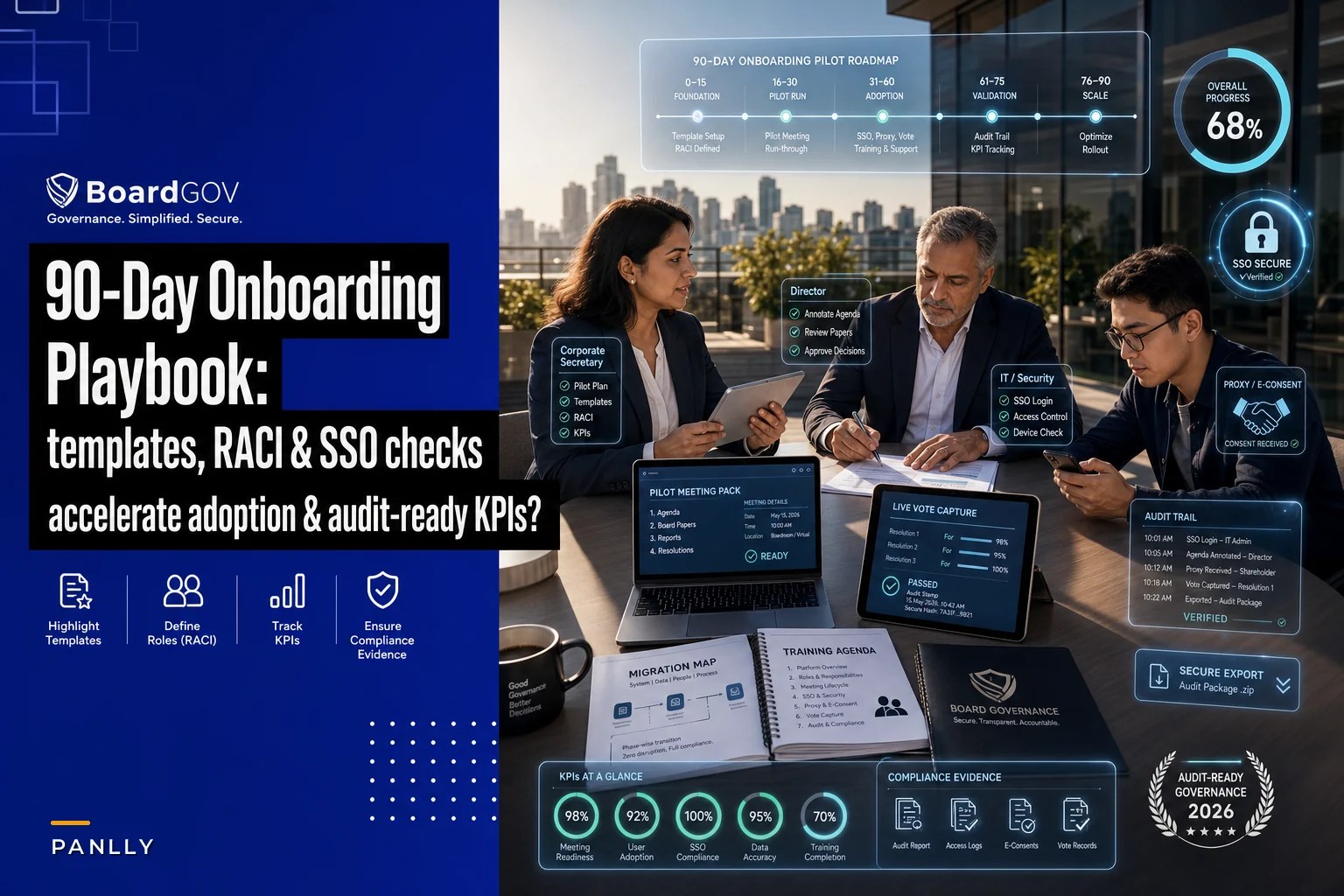
This playbook is about closing that gap on a disciplined 30/60/90 timeline. It assumes you've already finished vendor selection and have a migration roadmap in principle. What follows is the operational execution — who does what, in what order, with the specific checks that keep your audit trail intact when a regulator eventually asks for it.
Why onboarding fails even when the software is good
The platform is rarely the problem. Onboarding falls apart for three fairly boring reasons.
Nobody owns adoption. IT owns the install. The corporate secretary owns the content. But "did the directors actually change how they work?" sits in a gap between them. When you onboard board management software without a single named owner for adoption, it becomes everyone's side project and nobody's deliverable.
Migration gets treated as a copy-paste job. Moving ten years of board packs, resolutions, and committee files is not a data transfer — it's a records governance exercise. Teams that skip the mapping step end up with a searchable archive that nobody trusts, which means directors keep their own shadow copies.
Go-live happens on a real meeting. The single most common mistake: the first live use of the new system is an actual quarterly board meeting with real quorum and real votes. No dress rehearsal. When something breaks, it breaks in front of the whole board.
Keep those three failure modes in mind — the entire timeline below is built around preventing them.
The 30/60/90 at a glance
The table below captures the sequence at a high level. The timing isn't rigid — a nine-person non-profit board moves faster than a cross-border group with five subsidiaries — but the order matters. You don't train directors before security is locked, and you don't measure adoption before anyone's actually used the thing.
Eliminate boardroom chaos with seamless coordination.
Panlly simplifies scheduling, collaboration, and follow-ups for every board meeting.
- Centralized meeting scheduling
- Secure document sharing
- Task assignment & tracking
No credit card required
| Phase | Window | Primary goal | Who leads | Exit criteria |
|---|---|---|---|---|
| Phase 1 — Foundation | Days 0–30 | Configure, map data, lock security | Corporate secretary + IT | SSO working, RACI signed, migration mapping approved |
| Phase 2 — Go-live | Days 31–60 | Train directors, run a pilot meeting, enable workflows | Corporate secretary + committee chairs | One full pilot meeting completed on-platform |
| Phase 3 — Stabilize | Days 61–90 | Measure adoption, verify audit trails, remediate | Governance lead + internal audit | KPIs hit target, audit trail verified, remediation log closed |
The timing isn't rigid — a nine-person non-profit board moves faster than a cross-border group with five subsidiaries — but the order matters. You don't train directors before security is locked, and you don't measure adoption before anyone's actually used the thing.
Phase 1 (Days 0–30): Foundation and pre-go-live
This phase is unglamorous and it's where the whole program lives or dies. Nothing director-facing happens yet.
Start with a RACI, not a kickoff call
Before configuring a single setting, write down who's Responsible, Accountable, Consulted, and Informed for each workstream. Most teams skip this and regret it by week three when the migration stalls because nobody knew they owned data cleanup.
-
Platform configuration — Responsible
IT admin. Accountable: Corporate secretary. Consulted: vendor onboarding rep. Informed: board chair.
-
Data migration & mapping — Responsible
Corporate secretary. Accountable: General counsel. Consulted: records manager. Informed: audit committee chair.
-
Security & SSO — Responsible
IT security. Accountable: CISO or equivalent. Consulted: vendor. Informed: corporate secretary.
-
Director training — Responsible
Corporate secretary. Accountable: board chair. Consulted: committee chairs. Informed: all directors.
-
Audit trail & compliance sign-off — Responsible
Internal audit. Accountable: General counsel. Consulted: corporate secretary. Informed: audit committee.
The point isn't the specific grid — it's forcing the conversation now about who's accountable when something breaks later.
Assign a single named adoption owner with calendar capacity to lead the rollout.
Build the migration mapping sheet
This is the artifact that separates a clean rollout from a messy one. Before anything moves, build a mapping sheet that defines, row by row, where each type of record lives today and where it goes in the new system.
-
Source location (shared drive path, old portal, email archive)
-
Record type (board pack, resolution, committee minutes, policy, consent)
-
Target folder / taxonomy tag in new system
-
Retention rule applied
-
Owner responsible for verifying the move
-
Verified? (yes/no/date)
The discipline here connects directly to how you've structured your records in the first place. If you've already invested in a metadata standard and clean information architecture, this step goes quickly. If you haven't, the migration is the moment to fix it — and it's worth understanding how an enterprise governance information architecture for metadata and APIs shapes what "clean" even means before you start moving files.
A realistic pattern: a team migrating around 4,000 documents from a shared drive will typically find 15–20% are duplicates, superseded drafts, or misfiled records. Don't migrate the mess. Clean during mapping, not after.
Security and SSO checks before anyone logs in
Security configuration done after go-live is security configuration done under pressure. Lock it in Phase 1.
-
[ ] SSO integrated and tested with at least three real director accounts (not just an admin test account)
-
[ ] Multi-factor authentication enforced for all roles
-
[ ] Role-based permissions mapped (director vs. committee member vs. observer vs. admin)
-
[ ] Guest/external advisor access rules defined and time-limited
-
[ ] Audit logging confirmed as on and capturing document views, downloads, and votes
-
[ ] Data residency confirmed against your compliance requirements
-
[ ] Offline/downloaded document controls reviewed (can a director download a board pack to a personal device?)
-
[ ] Deprovisioning process tested — remove a test director and confirm access actually dies
That last one matters more than people expect. A director rotates off the board, and six months later their old login still opens confidential strategy decks. Test the exit, not just the entry.
Exit criteria for Phase 1
Don't move to go-live until: SSO works for real users, the migration mapping sheet is approved and signed, the security checklist is complete, and the RACI is agreed. If any of these is soft, you're carrying risk into the phase where directors are watching.
Phase 2 (Days 31–60): Go-live and adoption
Now it gets director-facing. The goal of this phase is not "everyone loves the software." It's "one full meeting runs on the platform with no governance gaps."
Set up meeting templates before you train anyone
Directors judge a new system in the first five minutes. If the first agenda they see is a blank template, confidence drops immediately. Pre-build:
-
A standard board meeting agenda template with consent-agenda and discussion sections pre-structured
-
Committee-specific templates (audit, comp, nominations) reflecting each charter's recurring items
-
A minutes template wired to pull motions and decisions into a clean record
-
A board pack cover structure so directors always find materials in the same order
Standardized templates also reduce the biggest complaint in hybrid governance — inconsistency between what's on screen and what ends up in the record. If agenda building has historically been reactive, it's worth grounding your templates in a proper stakeholder intelligence operating model for agenda mapping so the structure reflects what actually needs oversight, not just what got carried over from last quarter.
Director training that respects director time
The fastest way to kill adoption is a 90-minute group webinar that half the board joins late. Directors don't need a feature tour. They need to do their three or four actual tasks: open a pack, annotate it, vote, and sign a consent.
-
10 minutes — Access and login. Everyone logs in live via SSO, on the device they'll actually use. Fix problems in the room.
-
10 minutes — Finding and reading materials. Open the current board pack, use search, download for offline.
-
10 minutes — Annotation and private notes. Show how notes stay private and don't leak into the record.
-
10 minutes — Voting and e-consent. Walk through a test resolution and a test written consent.
-
10 minutes — Q&A and the "who do I call" slide. One name, one email, one phone number.
Run separate short sessions for power users — corporate secretary, committee chairs — who need the deeper configuration and minute-taking workflow. Mixing the two audiences wastes everyone's time.
Accessibility checks are not optional
Boards skew older, and vision, hearing, and motor accessibility directly affect whether a director can participate — and whether your meeting is defensible. Before go-live, confirm:
-
Screen-reader compatibility for board packs and the voting interface
-
Adjustable text sizing that doesn't break document layout
-
Captioning support for any integrated video conferencing
-
Keyboard navigation for directors who can't use a mouse comfortably
-
An accommodation request path with a named owner
An accessibility failure isn't just a courtesy problem. A director who can't read the pack or cast a vote cleanly creates a quorum and participation question you do not want in the minutes.
Secure proxy and e-consent workflows
This is where go-live earns its keep. Paper proxy and email consent chains are exactly what the new system should retire — but only if the workflow is configured and tested before a real vote depends on it.
-
A director delegates a proxy with documented, time-stamped authority
-
The system records who may vote on whose behalf and under what limits
-
An e-consent resolution circulates, each signature captured with identity verification and timestamp
-
The audit trail shows the full sequence — who signed, when, from where
Test the edge case: a director tries to vote after delegating a proxy. The system should block the double vote. If it doesn't, you have a quorum integrity problem waiting to happen.
Exit criteria for Phase 2
One complete meeting — or a realistic dress rehearsal — has run end to end on the platform: agenda built from a template, pack distributed, directors annotated, a vote cast, a consent signed, minutes drafted. If you can't say that cleanly, you're not ready for Phase 3.
A quick workflow for the pilot meeting process.
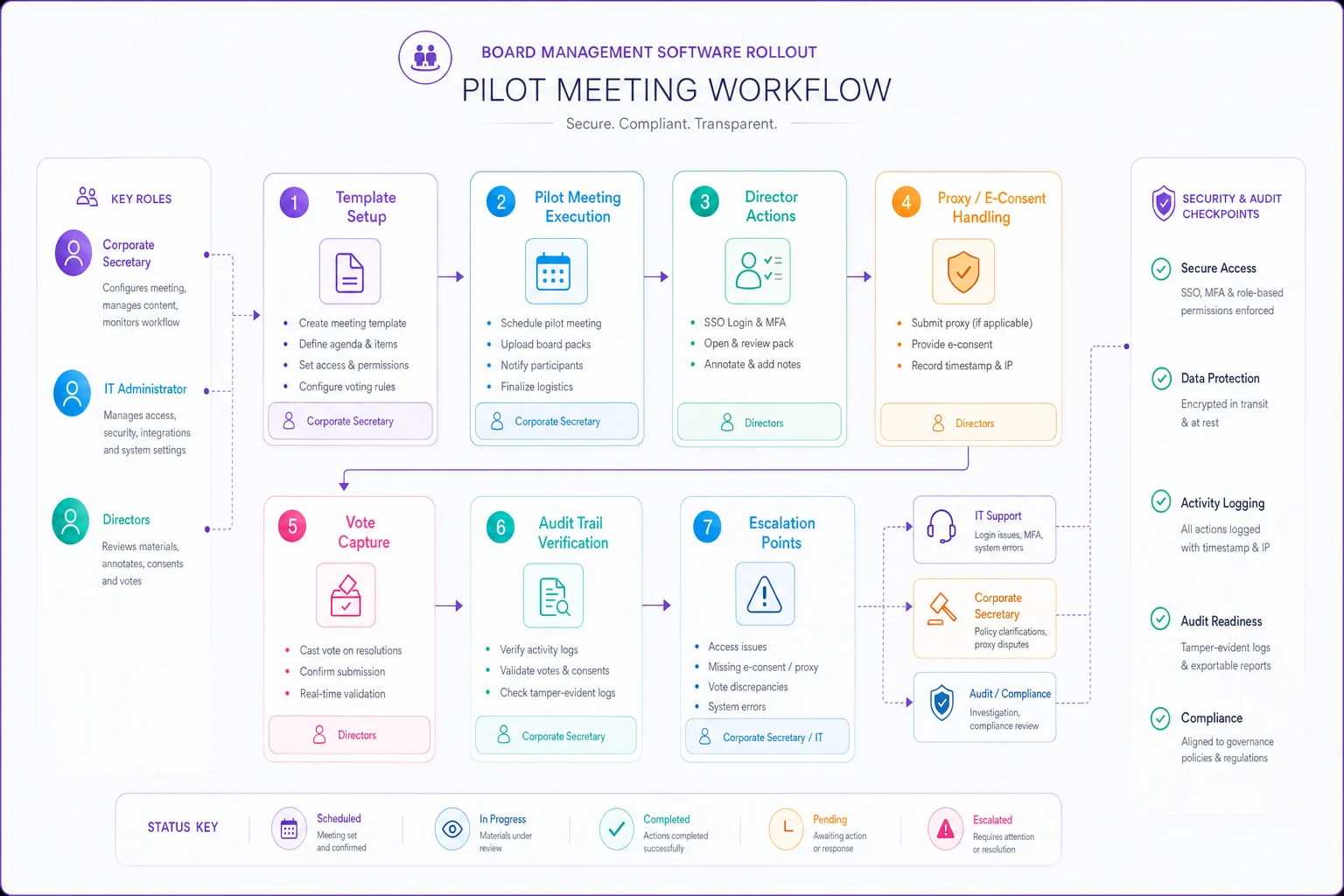
Use this to walk the pilot meeting from agenda to verified minutes during your rehearsals.
Phase 3 (Days 61–90): Stabilize, measure, remediate
The system works. Now you prove it works and fix what's quietly broken.
Adoption metrics that actually mean something
Vanity metrics like "number of logins" tell you nothing useful. What you want to track is behavior that signals the old habits are actually dying.
| KPI | What it tells you | Rough target by day 90 |
|---|---|---|
| % of directors accessing packs in-platform (not via emailed PDF) | Whether shadow distribution has stopped | 90%+ |
| % of votes/consents cast in-system | Whether the governance record is complete | 100% for formal actions |
| Avg. time from pack publish to director first-open | Engagement and prep behavior | Improving trend |
| % of minutes generated from platform templates | Record consistency | 100% |
| Open support tickets per meeting cycle | Friction trend | Declining |
| Off-platform document requests to the corporate secretary | Residual old-habit demand | Near zero |
The one to watch hardest is the first row. If directors are still getting packs emailed to them "just in case," adoption hasn't happened — you've just added a second system to maintain.
Verify the audit trail — don't assume it
The whole reason governance software exists is defensibility. So verify, with internal audit, that the trail is actually complete.
-
Pick one real decision from the last meeting cycle.
-
Reconstruct it entirely from the platform
the agenda item, the materials version directors saw, who viewed them, the motion, the vote tally, who voted, the resulting minute, and any consent.
-
Confirm timestamps are consistent and immutable.
-
Confirm you can export the whole chain in a format that would survive regulator or litigation review.
-
Document any gaps and assign remediation owners.
This reconstruction test is worth repeating quarterly, not just at day 90. It's also where boards dealing with newer oversight obligations — like the assurance lanes discussed in translating the new AI accord into board action — find out whether their records can actually evidence the oversight they claim to be doing.
Build an incident escalation flow before you need it
Something will go wrong — a failed vote, a permissions error exposing a confidential pack, an outage before a meeting. Define the escalation path now:
-
Tier 1 (friction) login issues, missing document. → Corporate secretary / admin resolves, logs it.
-
Tier 2 (governance risk) a vote recorded incorrectly, a quorum question. → Corporate secretary + general counsel, same day.
-
Tier 3 (security/confidentiality breach) unauthorized access to board materials. → CISO + general counsel + board chair, immediate, with documented notice.
Each tier needs a named owner, a time expectation, and a logging requirement. The log itself becomes evidence that you managed issues responsibly.
A realistic scenario
A regional healthcare non-profit with an 11-member board and three committees had been running on shared drives and email for years. Board packs went out as 60–80 page PDFs, version confusion was constant, and the corporate secretary spent roughly two full days per cycle assembling materials and chasing signatures on written consents.
They ran this 90-day playbook after purchase. Phase 1 surfaced that about 18% of their archived files were duplicates or superseded — cleaned during mapping rather than migrated. The security check caught two former directors with still-active drive access, closed before go-live.
By day 90, pack assembly dropped from roughly two days to about half a day per cycle. Written consents that used to take four or five days to collect by email were closing in under 24 hours with full audit trails. The number that mattered most to the chair: every formal vote in the last cycle was reconstructable from one place, with timestamps, in under ten minutes — down from a half-day scramble through email threads the one time a funder had previously asked.
Not a transformation story. Just a competent rollout that removed a recurring source of risk and a lot of quiet administrative pain.
When this timeline makes sense — and when it doesn't
When the 90-day pace fits: mid-size boards with at least one dedicated corporate secretary, a defined records base to migrate, and reasonably engaged directors. This is the sweet spot.
When to go slower: cross-border groups with multiple subsidiaries and conflicting data residency rules. Spend more of Phase 1 on mapping and security; the training and adoption phases can't start until the structure holds across entities.
When to go faster: small non-profit boards with little legacy data and few directors. You can compress Phase 1 to a couple of weeks — but don't skip the security checklist or the pilot meeting, no matter how small you are.
Who should not run this solo: a board with no dedicated secretarial function trying to onboard on evenings and weekends. Without a named adoption owner with real time allocated, the timeline collapses into "we'll get to it," which is how you end up paying for software nobody uses.
The templates to have ready
Pull these together before Phase 1 begins, not during:
-
Migration mapping sheet — source, record type, target taxonomy, retention rule, verification owner, verified date
-
RACI grid — one row per workstream, four columns
-
Pre-go-live security checklist — the SSO, MFA, permissions, logging, deprovisioning items above
-
Training agenda — the short, task-based session plus a separate power-user session
-
Incident escalation flow — three tiers, named owners, time expectations, logging requirement
-
Adoption KPI tracker — the behavior metrics, reviewed each meeting cycle
None of these are complicated. The value is that they exist and are assigned before go-live, so the rollout runs on a plan instead of improvisation.
Bringing it together
Onboarding board management software isn't a technical project — it's a change in how a board does its most sensitive work. The platform handles the mechanics. The timeline, the RACI, the migration discipline, and the audit verification are what make it stick.
Where modern platforms genuinely help is in collapsing the manual drudgery that makes governance teams dread every cycle: assembling packs, chasing consents, reconstructing decision histories by hand. AI-assisted workflow automation handles that recurring clerical load — not to replace judgment, but to stop the corporate secretary from spending two days a quarter doing administrative archaeology so they can focus on the work that actually requires their expertise.
The teams that succeed treat the first 90 days as a governance exercise with deadlines and owners, not an IT deployment they can delegate and forget. Get the foundation right in the first 30 days, prove it in the next 30, and measure it in the final 30. Do that, and the question "can we reconstruct this decision?" stops being a source of dread and becomes a ten-minute export.
Onboarding board management software isn't a technical project — it's a change in how a board does its most sensitive work. The platform handles the mechanics. The timeline, the RACI, the migration discipline, and the audit verification are what make it stick.
The teams that succeed treat the first 90 days as a governance exercise with deadlines and owners, not an IT deployment they can delegate and forget. Get the foundation right in the first 30 days, prove it in the next 30, and measure it in the final 30. Do that, and the question "can we reconstruct this decision?" stops being a source of dread and becomes a ten-minute export.
Ready to enhance your board's productivity?
Join 500+ organizations using Panlly to save time, improve governance, and streamline board operations.